Calisto
Release 0.4.21. Azure and Microsoft 365 are fully supported. AWS is a preview: its checks have not yet been tested against a live AWS Organization. Agencies are welcome to audit the code.
Calisto rates an agency's Azure, Microsoft 365 and AWS estates against ASD Essentials, the Australian Signals Directorate's October 2026 successor to the Essential Eight. It covers all three chapters ASD has published: enterprise IT, cloud, and operational technology. It runs inside the agency's own Azure tenancy, reads through the Reader role, read-only Microsoft Graph permissions and (when AWS is connected) a read-only AWS role, and changes nothing in the environments it assesses.
Calisto is free to use for Azure and Microsoft 365, with no licence fee and no subscription. The agency pays only for the Azure resources Calisto runs on in its own subscription (standing cost). AWS assessment is free while it is a preview and will be a paid option once it is fully supported.
Clouds
Azure and Microsoft 365 are fully supported. AWS is a preview in this release: its checks have not yet been tested against a live AWS Organization, so treat AWS ratings as indicative and confirm them by hand. Full AWS support is planned for the next release.
| Cloud | How it is connected | How Calisto reads it |
|---|---|---|
| Azure and Microsoft 365 | where Calisto is installed | the app's managed identity, with Reader across the tenant's management groups |
| AWS (preview) | an administrator connects it on the Permissions page | the same managed identity, federated into a read-only AWS role; no AWS key is stored |
One scan reads every enabled cloud. Each cloud's checks judge only that cloud's assets, and each warning says which cloud it came from. AWS assessment covers the whole AWS Organization when the member role is deployed to it. Azure landing zones with hub-and-spoke or Virtual WAN networking are read across all their subscriptions, including hub firewalls, routing intent, gateways and Bastion. The Permissions page shows whether Calisto holds each grant it needs. There an administrator makes the missing ones, signed in with their own roles, and connects AWS using role templates with the agency's values already filled in. The page can also test that every endpoint the collectors call is reachable through the agency's firewall. See Running Calisto.
The console
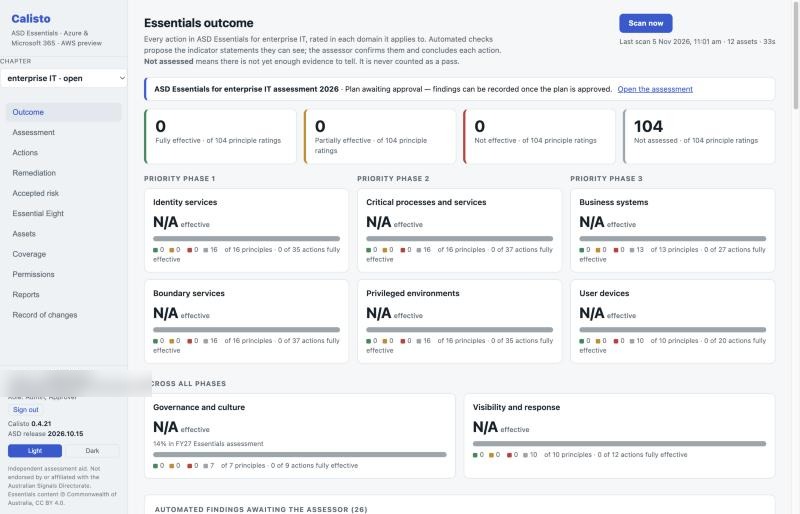
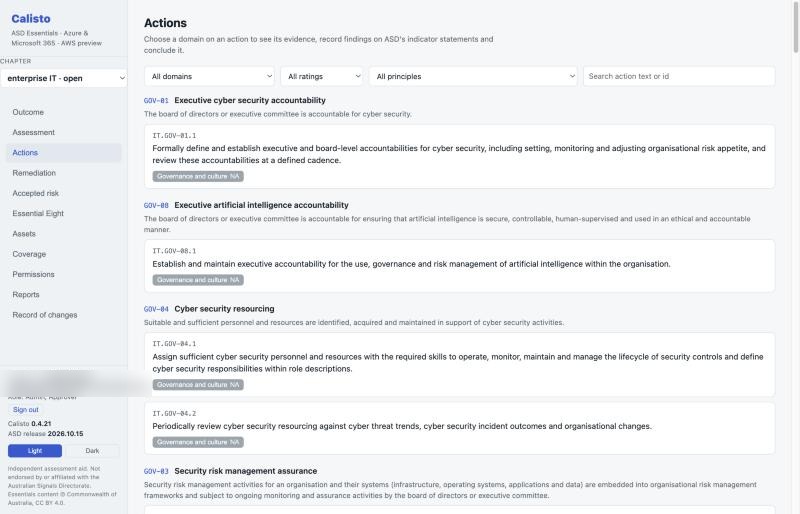
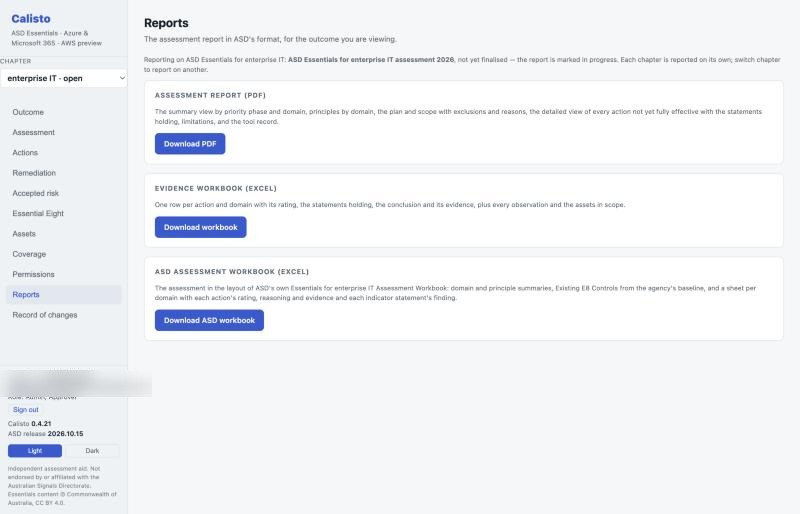
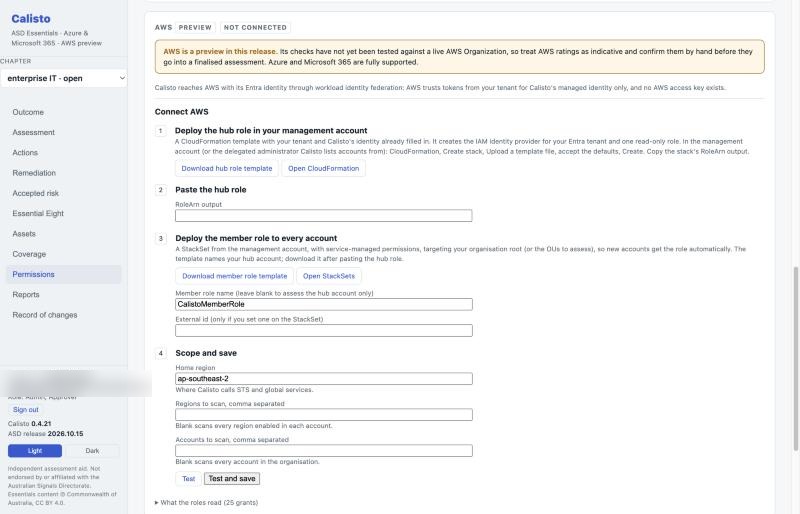
Chapters
ASD applies and assesses each Essentials chapter on its own, and Calisto keeps them apart in the same way. Each chapter has its own assessments, plans, scope, outcome, reports and registers, and nothing combines them into one rating. One assessment can be open per chapter and environment at a time; the database enforces it.
| Chapter | For | Principles · actions | How actions are rated |
|---|---|---|---|
| Enterprise IT | on-premises, hybrid and IaaS environments, which covers almost every agency | 28 · 58 | ASD's indicator statements and rule (below) |
| Cloud | environments delivered entirely through SaaS and PaaS | 30 · 78 | the assessor's conclusion, with check evidence |
| Operational technology | OT environments; it has no User devices domain and its own phase order | 34 · 61 | the assessor's conclusion |
Which chapter an asset can be assessed under follows from how it is delivered, as ASD's "which chapter" guide puts it: IaaS and on-premises assets belong to enterprise IT only; SaaS and PaaS services can be assessed under either; OT assets come from the agency's register. One scan serves every chapter, and each assessment reads it through its own scope: its chapter, its environment and its plan's exclusions. An asset one assessment excludes still counts in another.
ASD has published OSCAL, action numbers and indicator statements for enterprise IT only. For cloud and
OT, Calisto carries a transcription of ASD's published tables and numbers the actions itself, in the
order ASD lists them (for example CL.PRO-13.5 and OT.PRO-19.1). Without indicator statements there is
no rule to apply, so each cloud and OT rating is the assessor's conclusion and must cite its evidence.
Calisto's checks are written against enterprise IT actions; the relevant ones also speak to cloud actions
(essentials/cloud/checks.json) as evidence. No check speaks to OT.
In the cloud chapter each action carries ASD's responsibility marker for the plan's service model: customer, supplied (the provider supplies it; the agency enables, configures and operates it) or provider-inherited. For a provider-inherited action the agency's own configuration checks are set aside, and a rating must cite current provider assurance (an IRAP assessment scoped to the services used, say) from the assurance register; lapsed assurance is refused. The assessor can confirm a different split for the services the agency actually uses, with the reason.
Who does what
Sign-in is through Entra and cannot be switched off. Access comes from four app roles assigned in Entra:
| Role | Can |
|---|---|
Calisto.Viewer |
read everything |
Calisto.Assessor |
scan, plan, record findings and conclusions, register assets, raise remediation, draft exceptions, record assurance and the Essential Eight baseline |
Calisto.Approver |
approve assessment plans and accept risk, as the "appropriate authority" ASD's process guide names; never their own plan or their own draft |
Calisto.Admin |
everything, plus redacting personal information from finalised records |
Every change is recorded in an append-only audit trail with the person's Entra object id, the time, and the value before and after; on PostgreSQL a trigger refuses any update or delete of it. The console's Record of changes page and each report's workbook list it.
What it produces
Calisto carries an agency through an assessment the way ASD's Assessment process guide sets out, and produces the report the guide asks for.
- An assessment record. The plan holds what ASD lists: assessment type (self or independent) and the approving authority, operating context, domains and assets in scope with each exclusion's reason, methods, tools, sampling, existing evidence, evidence handling, access, stakeholders, timeframe, active testing, where the report is kept, interfaces with other chapters, and the reason for any departure from ASD's phase order. Someone other than its author approves it before any finding is recorded, and a material change after approval, including a change in the assets in scope, sends it back. Limitations met while assessing are logged without reopening the plan.
- A rating for every action in every domain it applies to, on ASD's scale of not assessed, not effective, partially effective and fully effective: 212 for enterprise IT, 265 for cloud and 141 for OT. Each rating carries its basis, the evidence relied on with its quality and date, and the specific gaps where it falls short.
- Principle roll-up and domain scores as the guide specifies: a principle takes its weakest action's rating and stays not assessed while any action is; each domain counts principles and scores them 1, 0.5 and 0 over the principles applicable, with ASD's test for a domain being addressed.
- A frozen result. Finalising needs evidence collected after the plan's approval, an unchanged scope, and a reason for any action left unconcluded (reported as not assessed). It freezes the outcome, the chapter as assessed, the scope, the tool record, the limitations and the registers, and keeps the reports byte for byte with the PDF's SHA-256, so a report re-issued years later is the one signed off.
- The programme around it: a remediation register (gap, planned action, owner, target date, status) shown against each gap; exceptions and accepted risk, each with an owner, a review date and an expiry, accepted by an approver under a named authority and flagged when lapsed; provider assurance; the Essential Eight baseline carried through transition in the terms of ASD's assessment workbook; and progress across finalised assessments.
- An asset register for what no collector can see, such as on-premises directories, VPNs, gateways, HR systems and OT, with the facts ASD's scoping guides ask for: owner, function, criticality, delivery model, environment, non-production, provider, AI, and for OT whether it is vital, its site, its dependencies and its isolation point.
- Reports: a PDF assessment report (summary view with progress, principles by domain, plan and scope, detailed view with gaps, evidence and remediation, remediation and accepted-risk registers, shared responsibility, limitations, tool record and record of changes), an Excel evidence workbook, and for enterprise IT the assessment in the layout of ASD's own Assessment Workbook. A report with no approved plan behind it is marked "not an assessment" on every page.
How ratings are reached
For enterprise IT, ratings follow the rule in ASD's Assessment evidence guide for enterprise IT, applied
to its indicator statements (cited by ASD's ids, for example IT.PRO-13.4.NE-1):
- Checks propose; the assessor confirms. ASD has tool evidence weighed critically, including for false positives, so a statement a check shows is a proposal. The assessor confirms it, or sets it aside with the reason (both are kept on the record). Nothing is rated until the assessor concludes.
- Any not-effective statement holding makes the action not effective. ASD calls one normally decisive.
- Otherwise, it is fully effective when every applicable fully-effective statement holds and no partially-effective one does, and partially effective in every other case.
- Expert judgement can depart from that rule (for example on a compensating arrangement) only with a recorded rationale and evidence, and the report marks it as such.
- Insufficient evidence leaves the action not assessed, with the reason.
Checks propose statements through a reviewable map (essentials/check-statements.json). The map is
deliberately conservative: a check names a statement only when its result demonstrates it as written, and
process, review and approval statements are left to the assessor. A check that falls short without
proposing any statement is still reported and listed for the assessor to review. A check that could not
see (for example, a missing permission) never counts as a pass.
Domains and scoping
Calisto proposes domains for every discovered asset from what it is and how it is exposed, following ASD's asset scoping guides, and keeps the reason with each placement:
- Identity services are the systems whose identity functions reach other systems: the Entra tenant, each AWS account's IAM and IAM Identity Center. Users and roles are evidence for actions in every domain, not assets, since ASD says a privileged account's presence does not place a system in a domain.
- Boundary services are whatever is reachable from the internet: public endpoints of every PaaS type that has them, virtual machines and load balancers with public IPs, and hub components (firewalls, VPN and ExpressRoute gateways, Virtual WAN hubs, Application Gateway, Front Door, Bastion). Boundary is added to an asset's other domains, never instead of them.
- Privileged environments hold the management planes: subscriptions and AWS accounts, Bastion, and privileged access workstations.
- Critical processes and services are the agency's call; nothing is placed there until it chooses.
- Capability domains hold no assets.
- Cloud-chapter assets also include non-person identities (enterprise applications, managed identities, workload roles) and Microsoft 365 services. AI systems (Azure OpenAI and AI services, Machine Learning and Foundry, AI Search, Bedrock, SageMaker) are flagged as AI.
Place assets in the console, with the reason, or tag resources with essentials-domain set to a
comma-separated list of ASD domain slugs; a tag adds to Calisto's proposal. Tag essentials-environment,
or map management groups, subscriptions, AWS accounts and organisational units to environments in
configuration, to assess a portfolio agency's environments separately.
Personal information
Check findings name the user accounts that fall short. They are kept with the frozen result as evidence. When the agency's records authority calls for disposal, an administrator redacts the email addresses and sign-in names in a finalised assessment's evidence; findings keep their counts with a stable pseudonym, the reports are re-issued from the redacted record, and the audit trail keeps both report hashes. Who assessed, approved and concluded stays on the record. All data stays in the agency's tenancy in an Australian region.
Source material
Calisto ships ASD's OSCAL release of the enterprise IT chapter unchanged
(src/main/resources/essentials/e4eit/, release 2026.10.15). The release includes ASD's indicators of
good practice and its mappings to ISM controls and Essential Eight requirements. To move to a new ASD
release, replace the files.
The cloud and OT chapters (essentials/cloud/chapter.json, essentials/ot/chapter.json) are
transcribed from ASD's published chapter pages by tools/transcribe_chapters.py. Principle statements
come from the ISM OSCAL catalog. Rerun the script when ASD revises a chapter, and replace the
transcription with ASD's own release if ASD publishes OSCAL for it.
All of this material is © Commonwealth of Australia and licensed CC BY 4.0.
Calisto is independent. It is not endorsed by, affiliated with, or produced on behalf of the Australian Signals Directorate.
Running
See Running Calisto.